
Personalize Your iPhone Home Screen with Music
Overview
Your Albums is a free multimedia application developed by blipp LLC, designed specifically for iPhone users seeking to enhance their device’s home screen with personalized music content. The app enables users to integrate favorite songs, playlists, albums, and music videos directly onto the home screen, creating a dynamic and expressive digital environment. By streamlining access to preferred audio content, the software eliminates the need to navigate through multiple apps or menus, offering immediate playback with just a tap.
Target users include music enthusiasts, iPhone owners who value customization, and individuals looking to reflect their personal style through digital interfaces. The app is particularly suited for those who enjoy curating their digital experience, blending music with visual aesthetics. Real-world use cases include setting up a home screen that reflects a specific mood—such as a workout playlist for morning motivation or a curated album for relaxation after work.
While the developer, blipp LLC, is identified, no additional background on the company’s history or other products was provided. The app leverages Apple Music integration, allowing users to search for songs, artists, playlists, and music videos directly within the platform. This integration supports both discovery and playback, enhancing the overall user experience.
Key Features & Capabilities
- Home Screen Integration: Add favorite songs, playlists, albums, and music videos directly to the iPhone home screen for instant access.
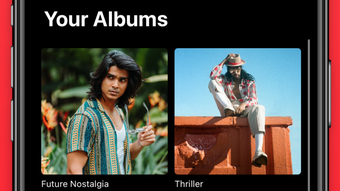
- Custom Artwork Replacement: Replace default album artwork with personal photos to create a visually cohesive and unique home screen layout.
- Seamless Apple Music Playback: Play music directly from the home screen without switching apps, improving workflow efficiency.
- Music Discovery Tools: Search across Apple Music for any song, artist, playlist, or music video, and access personalized recommendations.
- Recent Activity Access: View recently added and recently played tracks, helping users stay updated with their listening habits.
These features support a personalized digital experience by combining visual customization with functional convenience. For example, a user can create a home screen theme around a favorite album, replacing the original artwork with a concert photo. This not only enhances aesthetic appeal but also strengthens emotional connection to the music. The integration with Apple Music ensures access to a vast library, while the discovery tools encourage exploration of new content, balancing familiarity with novelty.
User Interface, Workflow & Performance
The user interface of Your Albums appears designed for simplicity and intuitive navigation. Users can access their music library, select items for home screen placement, and customize artwork through a streamlined workflow. The app likely follows iOS design principles, with clear icons, consistent spacing, and responsive touch feedback, though specific UI details were not disclosed.
Workflow efficiency is enhanced by the direct integration with Apple Music and the ability to place music content on the home screen with minimal steps. The app’s performance is expected to align with standard iOS app behavior, offering smooth transitions and responsive playback. However, exact performance metrics such as CPU or RAM usage were not specified.
Stability and reliability are likely maintained through Apple’s ecosystem standards, but no official data on crash rates or background behavior was provided. General software behavior suggests that the app operates efficiently in the foreground, with minimal impact on system resources during active use.
Compatibility & System Requirements
Your Albums is designed for iPhone devices and requires iOS to function. The app version is 1.2.0, with a file size of 45.8 MB. The developer did not provide additional system requirements, including minimum iOS version or hardware specifications.
Compatibility information is limited to the platform, indicating that the software is intended for Apple’s mobile ecosystem. Users should ensure their device is running a compatible version of iOS, though exact requirements were not listed. Installation is straightforward, and the app integrates directly with the iPhone’s home screen interface.
Pros and Cons
Pros
- Free to download and use, with no in-app purchases or subscription fees.
- Direct integration with Apple Music enables access to a vast music library.
- High level of customization, including personal photo replacement for album artwork.
- Streamlined workflow for placing music content on the home screen.
- Supports music discovery and recent activity tracking.
Cons
- Exact system requirements and compatibility details were not provided.
- Performance and resource usage data were not disclosed.
- Relies on Apple Music, limiting functionality for users without a subscription.
- Customization features may be limited to Apple Music content only.
- No information available on update frequency or long-term maintenance.
FAQ Section
Is Your Albums compatible with all iPhone models?
Compatibility is confirmed for iPhone devices, but specific model requirements were not listed. Users should ensure their device runs a compatible version of iOS.
Is the app safe to download and use?
Your Albums is developed by blipp LLC and distributed through the Apple App Store, which enforces security standards. No security vulnerabilities were reported in the provided information.
Does the app require an Apple Music subscription?
Yes, the app integrates with Apple Music, which requires a subscription for full access to songs, playlists, and music videos. Some features may be limited without a subscription.
Can I use my own photos as album artwork?
Yes, one of the core features allows users to replace default album artwork with personal photos, enabling full visual customization of home screen music tiles.
How often is the app updated?
The release date was provided as May 15, 2024, but no information was given about update frequency or future development plans.
Final Thoughts
Your Albums delivers a unique blend of personalization and functionality, transforming the iPhone home screen into a dynamic music hub. Its ability to integrate Apple Music content with custom visuals makes it ideal for users who value both aesthetics and convenience. While limited information on system requirements and performance is available, the app’s free status and seamless integration with Apple Music are strong advantages.
For iPhone users who enjoy curating their digital environment and want immediate access to their favorite music, Your Albums offers a compelling solution. The customization options, combined with easy playback, elevate the everyday iPhone experience.
Download Your Albums now







